
Arriving at a port should be a simple experience. However, in practice, many sailors always repeat the same steps: searching for the port, accessing information or planning their arrival.
If you have ever searched for how to saving locations in a navigation app, how to use apps to plan nautical routes or consult a marina maps, this problem will be familiar to you.
This is where concepts such as home port and favorite port in Portview allow organize all your navigation more efficiently.
How to organize your ports in a navigation app?
One of the main challenges in navigation is repetition:
- Multiple access to the same port
- Search for destinations you already know
- Planning routes without a clear structure
Many users are looking for solutions such as:
- Save locations in navigation apps
- Quick access to marinas
- View routes from a map
Organize your ports within Portview responds directly to these needs, allowing you to structure your navigation right from the start.
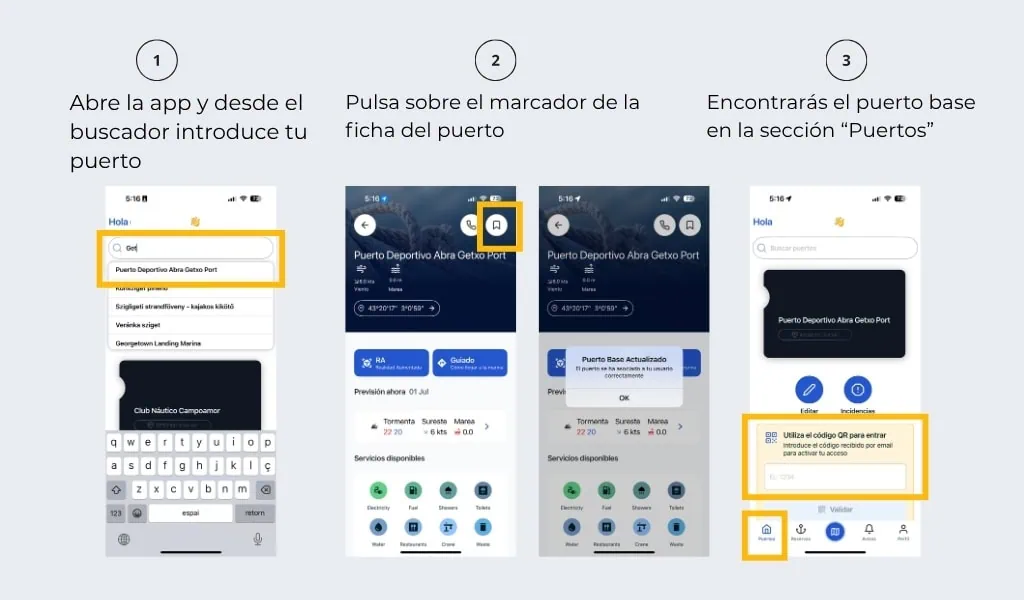
What is the base port in Portview and how does it improve your navigation?
The base port is the port you define as your main reference within the app.
It is a direct response to a very common need:
quickly access the port you always use without having to search for it every time.
What can you do with your base port?
- Direct access to your usual port
- Consult information from the beginning
- Centralize your daily operations
Instead of relying on constant searches on a map of marinas, the system takes you directly to your starting point.
How to save ports and locations in a navigation app?
Saving locations is one of the most sought-after features in any navigation app.
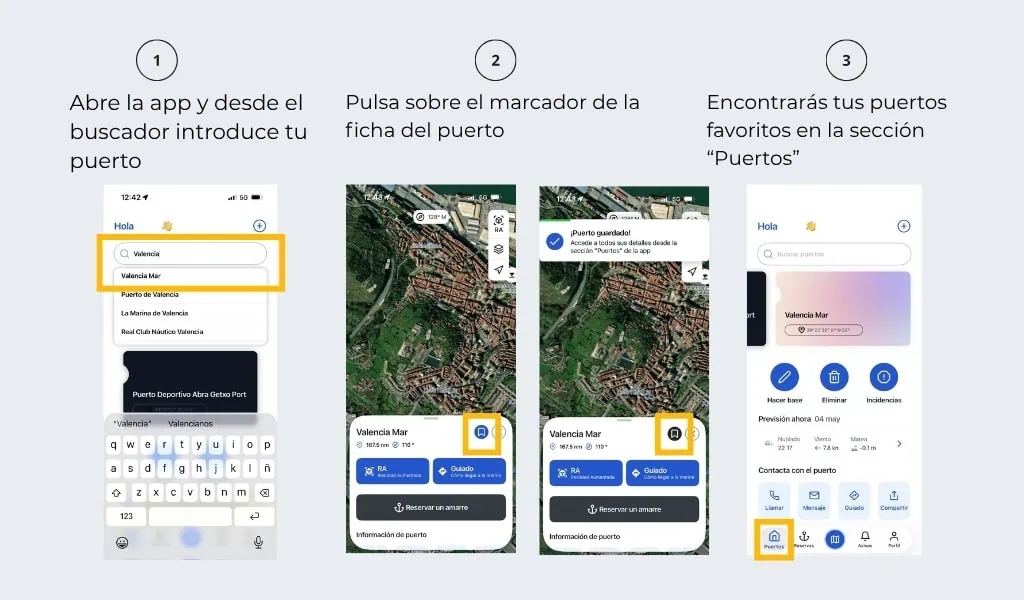
At Portview, This translates into the favorite ports.
A favorite port is any port that you save for quick access in the future.
What is the purpose of saving a port as a favorite?
Saving favorite ports allows you to:
- Avoid searching the same port repeatedly
- Have direct access to your usual destinations
- Better prepare your navigation routes
It is the equivalent of saving locations, but adapted to the nautical environment.
What is the difference between home port and favorite port?
Both concepts respond to different needs within shipping:
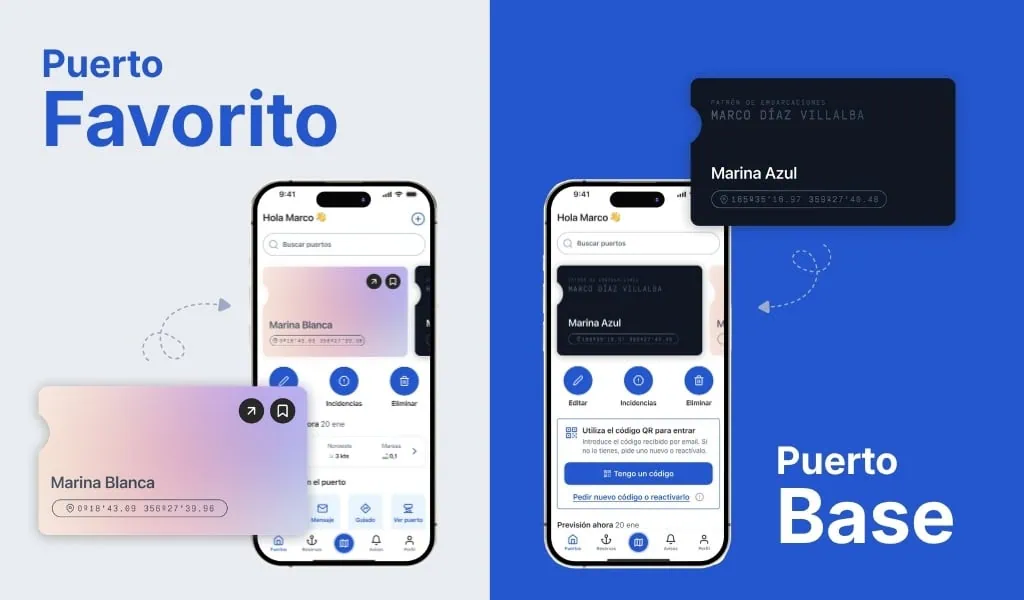
- Base port → your usual, operational port
- Favorite port → saved ports for quick access.
How do the base port and favorite ports complement each other?
The real value appears when both are used together.
This combination allows:
- Direct access to your usual port
- Have your recurring destinations saved
- Reduce search time per use
Instead of constantly navigating the map, you can go directly to what you need.
Why should you start organizing your ports today?
If you already use a marina map or are looking for ways to save locations in a navigation app, the next step is to organize that information.
Defining your base port and saving your favorite ports in Portview allows you:
- Simplify your navigation
- Reduce time
- Improve your experience at every arrival
Download Portview and define your ports
If you were looking for a way to save your ports and organize your navigation routes, Portview is the solution. Define your home port and save your favorite ports in Portview.
Download the app and complete your Nautical Passport.
Fewer searches. More navigation.